Tools get all the attention, but MCP servers can also expose data and reusable prompts, and they don’t have to run on your laptop.
Estimated Reading Time : 8m
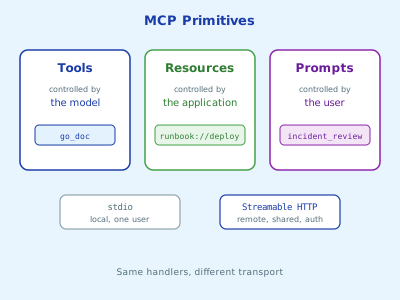
Three primitives, three owners
An MCP server can offer three kinds of things. The useful way to tell them apart is to ask who decides when they’re used:
| Primitive | Controlled by | Example |
|---|---|---|
| Tools | The model | go_doc, scale_deployment |
| Resources | The application | A runbook, a config file, a schema |
| Prompts | The user | An “incident review” template |
The model calls tools on its own. Resources are data the client application chooses to attach to the conversation, often because the user picked them. Prompts are templates the user invokes explicitly, usually as a slash command.
We’ll extend a small server with all three, then move it off stdio and onto HTTP so a whole team can share it.
Resources
Say your team keeps runbooks in markdown. Exposing them as resources lets anyone attach the right runbook to a conversation without copy-pasting.
//go:embed runbooks/*.md
var runbookFS embed.FS

func addRunbooks(server *mcp.Server) error {
    entries, err := runbookFS.ReadDir("runbooks")
    if err != nil {
        return err
    }
    for _, e := range entries {
        name := strings.TrimSuffix(e.Name(), ".md")
        server.AddResource(&mcp.Resource{
            URI:         "runbook://" + name,
            Name:        name,
            Description: "Runbook for " + name,
            MIMEType:    "text/markdown",
        }, readRunbook)
    }
    return nil
}

func readRunbook(ctx context.Context, req *mcp.ReadResourceRequest) (*mcp.ReadResourceResult, error) {
    uri := req.Params.URI
    name := strings.TrimPrefix(uri, "runbook://")

    body, err := runbookFS.ReadFile("runbooks/" + name + ".md")
    if err != nil {
        return nil, mcp.ResourceNotFoundError(uri)
    }
    return &mcp.ReadResourceResult{
        Contents: []*mcp.ResourceContents{{
            URI:      uri,
            MIMEType: "text/markdown",
            Text:     string(body),
        }},
    }, nil
}
Each resource has a URI, which is how clients refer to it. The scheme is yours to choose. runbook://deploy-rollback is clearer than a file path and doesn’t leak your server’s directory layout.
Embedding the runbooks with embed means the binary is the whole deployment. Swap it for a directory or a database when the content changes faster than you release.
Resource or tool?
If the model should decide when to fetch something, make it a tool (search_runbooks(query)). If a person or the application decides, make it a resource. Plenty of servers offer both: a resource for each runbook and a search tool that returns runbook URIs.
Prompts
A prompt is a parameterized template the user runs on purpose. It’s a good way to share a workflow that works well, instead of everyone retyping their own version.
server.AddPrompt(&mcp.Prompt{
    Name:        "incident_review",
    Description: "Draft a blameless incident review for a service",
    Arguments: []*mcp.PromptArgument{{
        Name:        "service",
        Description: "Name of the affected service",
        Required:    true,
    }},
}, func(ctx context.Context, req *mcp.GetPromptRequest) (*mcp.GetPromptResult, error) {
    service := req.Params.Arguments["service"]
    return &mcp.GetPromptResult{
        Description: "Incident review for " + service,
        Messages: []*mcp.PromptMessage{{
            Role: "user",
            Content: &mcp.TextContent{Text: fmt.Sprintf(
                "Write a blameless incident review for %s. "+
                    "Use the sections Summary, Timeline, Root cause, Impact and Action items. "+
                    "Check the matching runbook first and note where it was or wasn't followed.",
                service)},
        }},
    }, nil
})
In Claude Code, server prompts show up as slash commands, so the user types something like /mcp__runbooks__incident_review billing and gets the expanded prompt.
Going remote with Streamable HTTP
Stdio is perfect for a tool that runs next to the client. It’s the wrong choice for something a team shares, like runbooks, an internal API, or anything that needs credentials the user shouldn’t hold.
MCP’s remote transport is Streamable HTTP. With the Go SDK, the server code doesn’t change. Only main does:
func main() {
    server := mcp.NewServer(&mcp.Implementation{Name: "runbooks", Version: "v0.2.0"}, nil)
    if err := addRunbooks(server); err != nil {
        log.Fatal(err)
    }
    addPrompts(server) // the AddPrompt call from above

    handler := mcp.NewStreamableHTTPHandler(func(r *http.Request) *mcp.Server {
        return server
    }, nil)

    mux := http.NewServeMux()
    mux.Handle("/mcp", handler)
    log.Fatal(http.ListenAndServe("127.0.0.1:8080", mux))
}
The handler is a plain http.Handler, so everything you already know about Go HTTP servers applies: middleware, timeouts, TLS, metrics. The callback receives the request, which means you can return a different server per tenant or per user if you need to.
Point Claude Code at it:
claude mcp add --transport http runbooks http://localhost:8080/mcp
Remote means you own security
A stdio server inherits the user’s own permissions. A remote server is a network service, and it needs to be treated like one:
- Authenticate every request. At minimum, require a bearer token in middleware in front of the handler. For anything shared across an organization, use OAuth, which the MCP authorization spec is built around and the Go SDK has an
authpackage for. - Bind narrowly. Listen on
127.0.0.1during development, not0.0.0.0. - Validate the
Originheader on local HTTP servers, so a web page in the user’s browser can’t talk to your server.
I’ll go deeper on all of this in the next post on securing MCP servers.
A note on deprecated features
The 2026-07-28 revision of the MCP spec deprecates three client features: roots, sampling and logging. The Go SDK still supports them for at least twelve months, but I wouldn’t build anything new on them. Tools, resources and prompts are the stable core.
Wrapping up
Tools are for things the model decides to do, resources are data the application attaches, and prompts are workflows the user runs. All three take a few lines with the Go SDK, and moving from stdio to Streamable HTTP is a change to main, not to your handlers. Once the server is on the network, though, it’s a production service, and it needs authentication like one.